
So, this morning was the final session of the Create with Code Live Summer 2020 course, and the Graduation Play-a-thon. And while the course was definitely fun and illuminating, in one way I’m glad it’s over, because it means I can step away from my personal project for a while. For the last few weeks, and especially the last few days, I’ve been focusing almost exclusively on my personal project, wanting to get as much done as possible before the Graduation Play-a-thon in case my project was chosen to be played “on the air”. I’ve put in many hours on my personal project, and have gotten very little sleep the last few days, and while I’ve learned a lot, and it was certainly satisfying to see it develop… yeah, I could use a break.
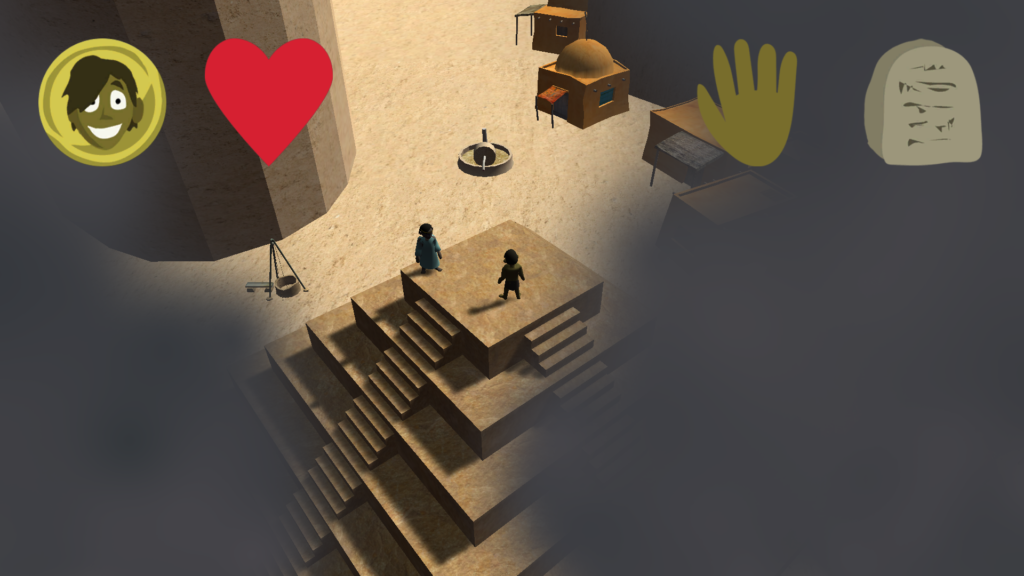
As it turns out, my project was not chosen to be played during the Graduation Play-a-thon—and really, that’s not at all surprising, and I shouldn’t have expected it to be. The projects that were chosen were much more polished and complete; mine was still more a proof of concept than anything else. I’d implemented a lot of (what I still think are) neat features—adaptive cursors, a fairly robust dialogue system, a control scheme with multiple ways to move around—and I even created several of my own 3d models, including my first ever attempt at rigging characters for use in games. But, well, as it currently stood, it wasn’t much of a game. You could talk to NPCs, you could fight some monsters, but there wasn’t really a win condition, or any sort of storyline implemented yet. Plus, well, there are the facts that the version of the game I uploaded had some significant glitches involving the player control that I was still working on ironing out, and that I didn’t upload my game to the Unity Connect site till a day or two before the Play-a-thon. I can definitely understand why the instructors didn’t select Last Day to Live for the Play-a-thon.
(Speaking of the control scheme, it occurred to me this morning that since I was already letting the player use the left and right arrow keys to rotate the view, I might as well also let them use the up and down arrows to move forward and backward—providing yet another means of moving around in the game. But this would require a new player state and be nontrivial to implement, so I didn’t try to put that in before the Play-a-thon.)
Honestly, my biggest mistake regarding my personal project was that I was way too ambitious. I think if I keep working on it, Last Day to Live has the potential to become a really good game… but it wasn’t something I should have expected to be able to get in any sort of playable state in six weeks. I learned a lot by doing it, and I had a chance to put into practice a lot of techniques and tools I’d learned not just from the Create with Code course but from the Beginner Fundamentals and Beginner Programming courses too, as well as some things that hadn’t been covered in any of those courses but that I’d figured out how to do from looking online and reading the documentation… but really, for the Create with Code personal project, I should have chosen a game with a more reasonable scope, something that I could do with what had been covered in the course, and that I could realistically put together in the course’s time frame.
There were over seventy games submitted for the Create with Code personal projects; you can see them all at the submissions page. The games that were showed during the Play-a-thon include:
- Survivor, by Botaemic
- Feeding Frenzy, by Knapps
- Gunny Joe! by Bojan Pađen
- Extreme Space Cab, by Sharkitty
- Raise Your Horde, by Maxeaman
- Happy Cat, by alfance
- Bubble-Buds, by Ari Atack
- Cargo Runner, by Teri Sandstedt
- War of the Kings, by Amaury Evrard
- Tiny Rewind Alien, by Daiman (this one wasn’t actually played during the session, because the instructors were out of time, but they highlighted it as one they had planned to play if they had time).
So what are my next steps, now that the Create with Code Live course is over? Well, as I mentioned before, I’m going to keep working on Last Day to Live—but not as obsessively as I have been for the last few weeks; I’m going to take it a bit easier now that I don’t have the deadline of the Play-a-thon hanging over me. Actually, I think I’m going to step back from doing any more coding or implementation until I pin down more about the design. I’d had the basic concept of the game in my head, and I’d filled out the simple two-page Project Design Document provided in the Create with Code course, but for an action RPG like Last Day to Live there’s a lot more I really should have planned out before I do any more serious work on putting together the game. I ought to have the game’s plot and characters worked out; a map of the game beyond the smallish starting area currently implemented; an idea of what enemies and items I want to include, and how character progression is going to work, and so on. I took the Unity Learn Beginner Design course, and it included a much more in-depth Project Design Document template than the one from the Create with Code course; I think I’m going to work on filling out a detailed design document using that template, and then also put some time into mapping out the gameworld.
As a bit of a counterpoint, I saw this tweet a few days ago:
So… yeah, I guess it’s possible to get too detailed with your design doc. But there’s a balance to be struck, and even if it would be overkill to write up a hundred-page design doc for Last Day to Live, I definitely need something much more in-depth than what I have now. For reference, the Swords ‘n Shovels design doc provided as a sample in the Beginner Design course is about twenty pages long, though the last couple of pages have placeholder entries that, if fully fleshed out, would probably add another five or ten pages.
(I have, incidentally, written a detailed design doc before, a forty-four page design document for a project called Changeling: Nightmares that… never went anywhere, and had never really had a realistic chance of getting off the ground in the first place. That’s a story that’s probably worth telling here someday, but that day will not be today.)
As I mentioned before, I also plan on going through the Unity Learn Beginner Art course; I want to learn more about how to create my own models for use in Unity. I mentioned before that this tutorial seems to lean mostly on ZBrush and Maya to create the models, and I don’t have either of those programs and can’t currently afford them—but that I should be able to figure out how to do what i need to do with the free open-source modeling program Blender. (Related, I also want to finish going through some Blender tutorials that I started.) As it happens, though, I’m starting this week a teaching job at LAUSD—which means I’ll be able to qualify now for educational discounts for both those programs. Hm… actually, even with the discount ZBrush is still pretty dang expensive, but Maya is free to educators, so that’s nice. Of course, there’s the drawback that the educational plans can’t be used for commercial purposes, but that’s OK; I just want to learn the software for now, and it’ll be quite some time before I’m at the point that I’m creating games I think I can actually sell.
Anyway, though, although I’ll still be working on Last Day to Live, I won’t be working on it as fervently or as fixedly as I have been during the Create with Code course, so I probably won’t continue to make weekly updates about my progress—I will post about my progress, but not weekly. But I’ll be posting about other things. Now that I don’t feel the need to rush to get as much as possible of Last Day to Live done for the Play-a-thon, I can maybe branch out and work on some other projects as well. Especially if I get an idea that appeals to me for a simpler game I can knock out in a few weeks—sure, I have ambitious plans for Last Day to Live, and I have ideas for other relatively complex games I want to create, but it would be nice to actually have some finished games under my belt. I may post too about the courses I’m taking on Unity Learn—for instance, I also was enrolled in the live Roll-a-Ball course, and that just ended yesterday; I’ll probably make a post about that tomorrow. (I would have posted about it earlier, but, well, again, I was focused on working on Last Day to Live.) Also, a new LEGO Microgame has just been announced, and I think I’m going to try that out. Furthermore, I may occasionally post my thoughts about other games; in particular, there’s a now sadly defunct mobile game that I’d been intending to make a post about since I first started this blog, and I’ll try to finally make time for that this week too.

So anyway, the Create with Code Live Summer 2020 course is over… but my work on Last Day to Live is not, and neither is this blog. I’ll be back here tomorrow with my thoughts about the Roll-a-Ball course, and after that… well, there’ll be plenty more to come.
